When AI Agents for Non-Technical Teams Reach the Shared Drive
Agentic tools have moved out of the private chat window and into the folders a team depends on. What that relocation actually changes, checked against vendor documentation as of August 2026.
Offices here ran on group chats and shared drives long before anyone in them said the word agent out loud. What arrived over the past year was not a cleverer chatbot. It was a change of address. AI agents for non-technical teams have moved out of the private chat window and into the directories where a company's real work sits, which means a finance coordinator who has never opened a terminal now points a planner at a folder of live spreadsheets and goes to lunch.
That relocation is the whole story. Almost everything difficult about this follows from it.
I want to be precise about what exists, because this category attracts confident description of features nobody has confirmed. Everything below is checked against vendor documentation, not marketing summaries, and where a product does something narrower than the category promises I say so.
What changes when the agent works on files instead of messages
In a chat window, the unit of work is a message and the blast radius is a transcript. You read something wrong, you close the tab. Once an agent holds folder access, the unit of work is a file other people depend on.
Anthropic's support documentation for Claude Cowork describes granting access to local folders on the desktop app, after which Claude can read from and write to those files without manual uploads or downloads. The named outputs are ordinary office material: Excel workbooks with working formulas, PowerPoint decks, formatted documents. The named example tasks are expense reports built from batches of receipts, outlier detection across a dataset and reorganising hundreds of files by type and date. Microsoft's Copilot Cowork documentation, updated 19 August 2026 and marked generally available for work or school accounts, goes further into action: drafting and sending mail through Outlook, posting into Teams channels, creating SharePoint and OneDrive folders, scheduling meetings.
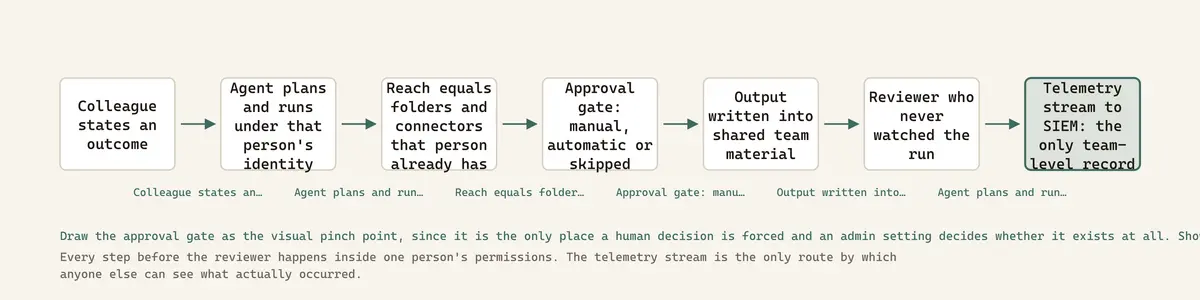
Three things shift at once. Undo becomes a real engineering problem rather than a keystroke. Provenance evaporates, because the file carries no marking that distinguishes the six rows a person typed from the four hundred an agent generated. And the output arrives looking native, which means it inherits the trust of the folder it lands in. A deck in the team drive reads as a team deck.
Formatted output suppresses scrutiny. A rough answer in a chat bubble invites checking. The same answer inside a styled workbook, sitting in the folder where last quarter's approved numbers live, does not.
Shared material, unshared agent
Here is the detail that most writing on this topic gets wrong, and it comes straight from the vendor. Anthropic's own support article on Cowork projects states plainly that for members of Team and Enterprise plans, Cowork projects do not support project sharing. Projects live on the individual's computer with no cloud sync. Each colleague runs their own instance.
So the workspace is shared. The agent is not. Every run happens inside one person's permissions, on one person's machine or in one person's cloud session, and what reaches the team is the output.
The one place Anthropic has shipped genuine multi-person sharing is live artifacts, the persistent interactive dashboards that run on every paid plan but can only be shared on Team and Enterprise, and the design decision there is the most interesting governance primitive I have seen in this category. The documentation states that shared artifacts use the viewer's access, not yours. The dashboard reconnects to the recipient's own connectors. That closes off permission laundering, where somebody with broad access builds a view and hands it to a colleague who should never see the underlying rows.
Microsoft reaches the same principle by different plumbing. Copilot's overview documentation describes access as scoped by user permissions, with grounding through Microsoft Graph and Work IQ. Same rule. The agent is a pair of hands attached to one identity, and it can touch exactly what that identity could already touch.
Which sounds reassuring until you remember what that identity can usually already touch.
Access, audit and what the agent is allowed to touch
Access first. An agent inherits its operator's reach, so if your document store overshares, the agent becomes an oversharing detector with a publishing function attached. Microsoft's own Copilot documentation sells SharePoint Advanced Management and a feature called Restricted content discovery explicitly to reduce oversharing before deployment. When a vendor ships remediation tooling alongside the product, treat that as a statement about the base rate.
Audit second. Anthropic streams Cowork events through OpenTelemetry on Team and Enterprise plans, and the exported set is genuinely detailed: user prompts, tool and MCP invocations, file access, skills and plugins, human approval decisions, API requests and errors, all joined by a shared prompt ID so one user instruction can be reconstructed end to end. Cowork on web, desktop and mobile is also captured in the Compliance API. Two caveats from the same documentation matter more than the feature list. Events export only when an administrator configures an OTLP endpoint, so the audit trail is opt-in. And prompt content is included by default, which makes the audit log itself a sensitive store requiring its own retention policy.
Third, permission over actions. Anthropic's safety documentation names three oversight levels: manually approve each action, automatically approve after a safety review, or skip approvals entirely. Deletion always requires explicit permission regardless of mode. On the administrative side, allowing automatic-approve mode is on by default, while allowing always-allow for connector tools is off by default. Cloud sessions default on for Team plans and off for Enterprise. Enterprise can scope Cowork by groups and custom roles.
One line from Anthropic's computer use documentation deserves quoting for its honesty. On that capability, a research preview available on Pro and Max only and not offered to Team or Enterprise at all, the docs state there is no sandbox between Claude and your applications. Vendors do not usually write that down.
Plausible output entering a real workflow
Now the failure that actually happens. Not a dramatic breach. A reconciliation runs, a join fails on forty rows, the agent proceeds with what matched, and the workbook comes back with correct formatting, a plausible total and a formula bar that looks like work. The person who requested it checks the shape. The shape is perfect.
OWASP lists these as two separate entries in its 2025 Top 10 for LLM Applications, LLM09 Misinformation and LLM06 Excessive Agency. This failure mode is what happens when they meet: a confident wrong artifact plus enough permission to file it. The EU AI Act's Article 14 on human oversight names the human half of the mechanism directly, requiring that overseers remain aware of the tendency to over-rely on system output, which the text calls automation bias, and be able to correctly interpret that output. Article 14 governs high-risk systems and most document work is not high risk. The diagnosis still applies.
The danger is not the wrong number. Formatted output suppresses scrutiny. A rough answer in a chat bubble invites checking. The same answer inside a styled workbook, sitting in the folder where last quarter's approved numbers live, does not.
Review that works when the reviewer is not an engineer
Four moves, none of which require the reviewer to read code.
Review the inputs, not the artifact. Ask what the agent actually read, and insist the answer is a file list rather than a summary. File access events already exist in the telemetry stream for exactly this. A person who knows the business can tell you instantly that a file which should have been consulted was not.
Require a stated method in plain language, delivered before the artifact and separately from it. If the described method is wrong, the artifact is wrong, and evaluating a described method is a business skill rather than a technical one. Anybody who can say "you should not be matching those two lists on customer name" has just performed a code review without knowing it.
Plant known answers. Keep three or four records in the corpus whose correct treatment you already know, including one designed to fail cleanly. This is the cheapest control available and it needs no technical training at all. It is also the only one on this list that catches silent row loss.
Separate the person who runs from the person who accepts, and set approval to manual for anything crossing a team boundary. The EU AI Act's Article 4, in force since 2 February 2025, obliges deployers as well as providers to build AI literacy in staff, calibrated to their technical knowledge and the context of use. Read plainly, that training bill lands on the organisation deploying the tool, not the vendor selling it.
Handing this to people who cannot audit it moves the risk rather than reducing it
The strongest objection is the one I find hardest to answer, so let me put it at full strength.
An engineer handed a bad agent output has reflexes. Row counts. Units. Whether the join key is unique. Those reflexes are not a checklist, they are an accumulated instinct about how computation goes wrong, and they took years. A marketing manager has none of it, and this generation of tooling is deliberately built so that she never needs to acquire any. The failure has not been removed from the organisation. It has been relocated to the point with the least diagnostic capacity and the highest confidence in the artifact, precisely because the artifact came out formatted.
It is worse than that. Under the old arrangement the analyst was a bottleneck, and the analyst was also a filter. Remove the bottleneck and you remove the filter, and organisations only notice the second part later. In Shenzhen trading firms and across a lot of African SMEs I work with through the forum, that filter never existed in the first place. Operations staff have been running the entire business on spreadsheets nobody audits for years. Agents do not create that exposure. They scale it.
And my own advice above has a hole in it. Reviewing the method only works when the reviewer knows what a correct method looks like for that task. Somebody who does not understand a lookup cannot evaluate a described lookup, and a fluent explanation of a wrong approach is exactly what these systems produce best.
My honest position is not that the objection is wrong. It is that the same argument was made about spreadsheets in the 1980s, spreadsheets won anyway, and the profession then spent thirty years paying for spreadsheet errors it had been warned about. This risk is going to be accepted whatever anyone writes. The useful question is whether it gets accepted with a log running.
Where this genuinely earns its place
Repetitive document work with a known-correct shape. Receipts into an expense report. Two hundred files into a sane folder structure. Reformatting a set of records into a template that already exists. These are the tasks Anthropic's own getting-started material leads with, and that is not accidental, because they share one property: the person requesting the work already knows what right looks like.
Drafting, where a human was always going to rewrite it. The agent produces the version you argue with. Anybody who has stared at an empty document knows the value of that and also knows nobody is going to ship the first pass.
Synthesis across a corpus the team owns, where every claim can be traced back to a source document sitting in the same folder. Owning the corpus is what makes verification possible.
The common thread is not difficulty and it is not technical skill. It is whether the answer is checkable. Where the agent produces something the team can immediately recognise as right or wrong, the economics are excellent. Where the output is the first time anyone has computed that number, they are terrible, and the fact that a non-technical colleague produced it faster is not an argument. That is the real line. Verifiable against novel, not technical against non-technical.
The log nobody has time to read
Both vendors have done the observable part well. Anthropic streams prompts, tool calls, file access and approval decisions to whatever collector an admin points it at. Microsoft shows each step in the session and pauses before sensitive actions, with a risk level indicator on the medium and high risk ones and a button labelled for the action itself. These are careful designs by people who thought about the problem.
Observability is not oversight. A stream that captures everything and is read by nobody is a liability wearing the costume of a control, because after the incident it proves the organisation could have known.
Anthropic's documentation says a Cowork project cannot be shared with a teammate today. That limitation is doing quiet safety work: it keeps every run attached to one accountable person. When the product eventually does support shared projects, and it will, the accountability question becomes genuinely hard for the first time, and the answer will have to be built before anyone asks it rather than after.
Tools referenced
Claude, reviewed here: Claude review.
Manus, reviewed here: Manus review.
Glean, reviewed here: Glean review.
Harvey, reviewed here: Harvey review.
Langfuse, reviewed here: Langfuse review.
Promptfoo, reviewed here: Promptfoo review.
Sources
Anthropic support: Use Claude Cowork safely: https://support.claude.com/en/articles/13364135-use-claude-cowork-safely
Anthropic support: Use Claude Cowork on Team and Enterprise plans: https://support.claude.com/en/articles/13455879-use-claude-cowork-on-team-and-enterprise-plans
Anthropic support: Monitor Claude Cowork activity with OpenTelemetry: https://support.claude.com/en/articles/14477985-monitor-claude-cowork-activity-with-opentelemetry
Anthropic support: Organize your tasks with projects in Claude Cowork: https://support.claude.com/en/articles/14116274-organize-your-tasks-with-projects-in-claude-cowork
Anthropic support: Use live artifacts in Claude Cowork: https://support.claude.com/en/articles/14729249-use-live-artifacts-in-claude-cowork
Microsoft Learn: Copilot Cowork overview (updated 19 August 2026): https://learn.microsoft.com/en-us/microsoft-365/copilot/cowork/
OWASP Top 10 for LLM Applications 2025: https://genai.owasp.org/llm-top-10/
EU AI Act, Article 14: Human Oversight: https://artificialintelligenceact.eu/article/14/
Frequently Asked Questions
Can a whole team share the same Cowork project?
Not as of August 2026. Anthropic's support documentation states that for members of Team and Enterprise plans, Cowork projects do not support project sharing, and project data lives on the individual's computer with no cloud sync. The sharing that does exist is for live artifacts, which are available to share within an organisation on Team and Enterprise plans.
What can an administrator actually see when a non-technical colleague runs an agent?
On Team and Enterprise plans, Anthropic can stream Cowork events through OpenTelemetry: user prompts, tool and MCP invocations, file access, skills and plugins, human approval decisions, and API requests and errors, linked by a shared prompt ID. Two limits matter. Events export only after an admin configures an OTLP endpoint, and prompt content is included by default, so the log itself needs a retention policy.
How do you stop an agent touching files it should not?
Access is inherited from the operator's identity rather than granted separately, so the control is your existing permissions model plus scoping. Anthropic offers three oversight levels, manual approval, automatic approval after a safety check, and skipping approvals, with deletion always requiring explicit permission. Administrators can turn off automatic-approve mode and can restrict always-allow for connector tools, which is off by default.
What is the most useful review step for someone who cannot read code?
Plant known answers. Keep three or four records in the corpus whose correct treatment you already know, including one designed to fail, then check those specific records in every output. It requires no technical skill and it is the only lightweight control that reliably catches silently dropped rows, which is the failure that formatted output hides best.

About Francis Okafor
Nigerian engineer, eight years inside China's tech ecosystem, writing from Shenzhen. I build agentic AI systems that drive physical hardware, and I write about how these systems behave once they are carrying real load.